
/w1440.webp)
AI Manga Generator: Create Manga with AI in Minutes
Create unique, high-quality manga pages online in minutes with Try OC Maker’s AI manga generator. Enter your text prompt or script, or upload a character reference image to get multi-panel AI manga with consistent characters, panel layouts, dialogue, and speech bubbles. No drawing skills needed.
Generate Your Manga Now/w1440.webp)
Generated Results
Your latest creations, grouped by local date.
Sign in to see your manga history. You can prepare your script before signing in.
See What You Can Create with AI Manga Generator
/w1440.webp)
/w1440.webp)
/w1440.webp)
/w1440.webp)
/w1440.webp)
/w1440.webp)
/w1440.webp)
Generate Studio-Quality AI Manga Pages That Bring Your Stories to Life
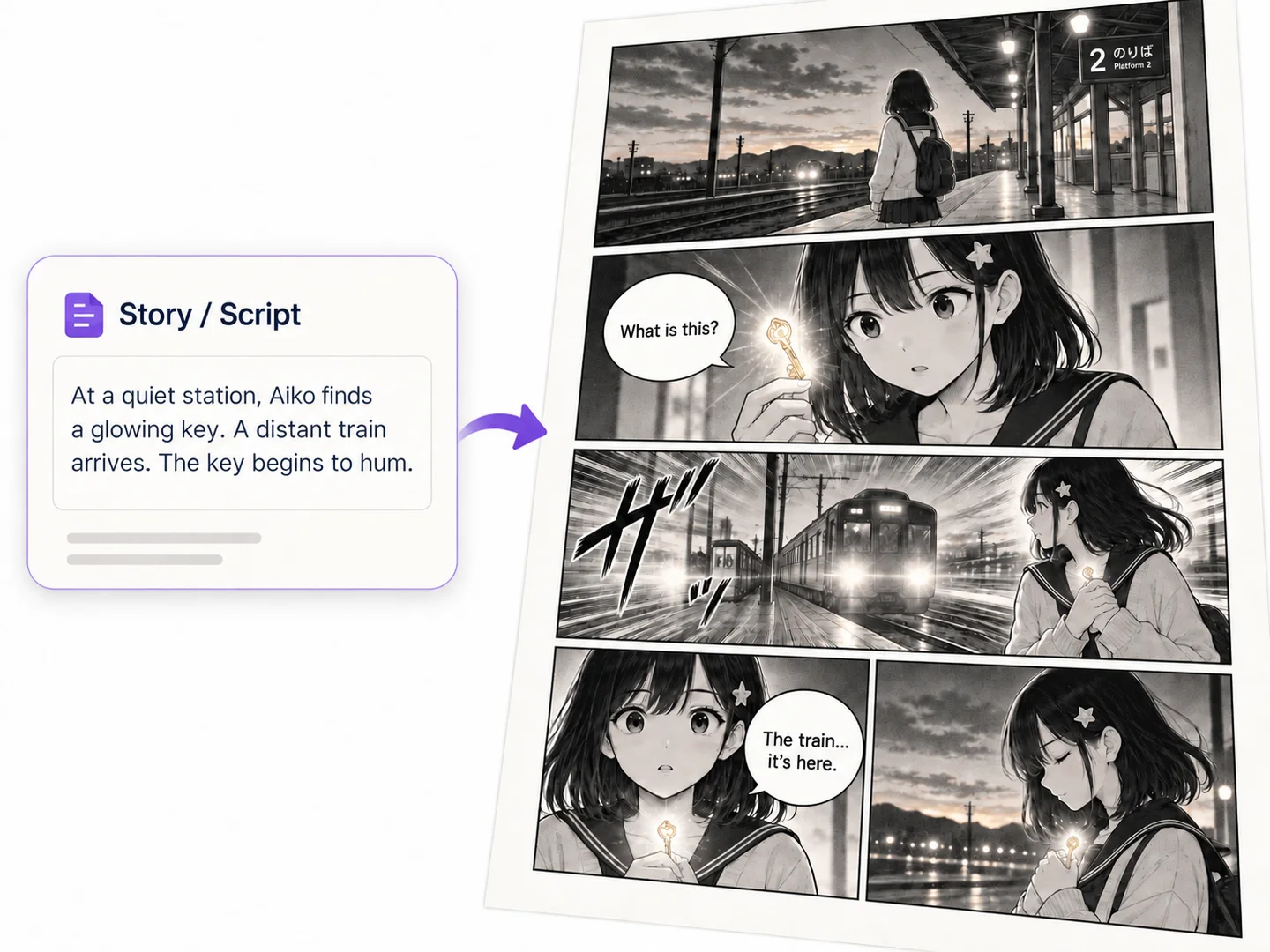
Easy AI Manga Generator from Text and Scripts
Have you dreamed of turning your story into a complete manga page? Now, our AI manga generator can handle the visual work for you. No need to draw every character, scene, and panel by yourself anymore.
Just enter a short idea, detailed story, or finished script, and the AI can turn it into a complete page with connected scenes, manga panels, and dialogue. Instead of generating separate manga-style images one by one, you can build a readable visual story on one page.
Create Manga from Text/w1440.webp)
Automatically Turn Stories into 1–6 Manga Panels
Not sure how to divide your story into manga panels? No problem. Just choose a 1–6-panel template, enter the action and dialogue, and our manga AI generator will arrange the characters, scenes, camera angles, and story beats across the page.
You can generate classic black-and-white manga with ink lines and screentones or choose full color for a brighter digital look. The automatic layout makes it easier to turn a written scene into a clear sequence without arranging every panel manually.
Create Your Manga/w1440.webp)
Keep Characters Consistent Across Manga Panels
Create connected manga panels while keeping the same character recognizable in every scene. Just upload a character image or character sheet as the reference; our AI manga creator helps maintain the same face, hairstyle, outfit, colors, and key features across different poses and camera angles.
With a stable character design, you can continue the story from panel to panel without your main character suddenly looking like someone else.
Start Your Manga/w1440.webp)
Customize Your Manga with Built-in Editing Tools
Need additional edits for the manga page generated by our AI manga maker? That is easy. Built-in editing tools allow you to replace dialogue, move or resize speech bubbles, adjust the panel layout, and correct unwanted details.
If one panel does not match your story, you can regenerate that panel separately while keeping the rest of the page unchanged. There is no need to start the entire manga page again because of one incorrect face, pose, scene, or line of dialogue.
Turn Ideas into MangaHow to Create Manga with AI
Two longtime rivals share a tense confession after an argument...
GenerateStep 1
Add Your Story and Characters
Enter your manga story or script. You can also upload character images to guide their appearance.
Step 2
Choose Your Manga Settings
Select an AI model, panel layout, manga style, and either black-and-white or full color.
Step 3
Generate Your Manga Page
Click Create Manga Now. Preview the generated manga page or view previous results in History.
Explore Popular Manga Styles
AI Manga Creation vs. Traditional Manga Creation
What mattersAI Manga CreationTraditional Manga Creation
Creation timeCreate first-draft manga concepts in secondsSketching, inking, and cleanup can take hours
Drawing skillsBegin with a written idea or reference imageRequires practiced anatomy, perspective, and linework
RevisionsChange the prompt and generate a new directionRedraw or repaint the affected panel manually
Early-stage costExplore several directions with credits in one toolMay require artists, software, and longer production time
Creative controlDirect characters, framing, mood, and style through promptsFull manual control over every line and production decision
AI Manga Generator FAQs
What is the best AI manga generator?
The best AI manga generator should do more than turn a prompt into one manga-style image. Look for story-to-page generation, automatic panel layouts, consistent characters, reference image support, editable dialogue, panel-by-panel regeneration, and high-resolution export. The right choice depends on whether you need a single illustration, a four-panel manga, or a complete multi-page story.
Is your AI manga generator free with no sign-up or watermark?
You can try Try OC Maker’s AI manga generator with 40 free Credits. You may need to sign in to save projects, receive more Credits, or continue editing your manga. Watermark-free downloads are available with a paid plan.
How do I write a good prompt for an AI manga generator?
Describe the page format, characters, action, setting, visual style, camera angle, and mood. Keep each character’s hair, clothes, colors, and facial features specific so they remain recognizable across panels. For example: “A black-and-white four-panel manga page. A teenage swordswoman confronts a masked rival on a rainy rooftop. Keep her short silver hair, black haori, and scar over her left eye consistent. Use low-angle shots, bold ink lines, speed lines, dramatic screentones, and right-to-left panel order.” Write the dialogue separately when possible so it can be added as editable text instead of being drawn into the image.
Do I need drawing skills to use an AI manga creator?
No. You can describe your characters, scenes, and actions in everyday language, and the AI manga creator will turn them into manga artwork. Basic storytelling choices—such as who appears in each panel, what happens, and how the characters react—are more useful than drawing experience.
Can AI generate manga with speech bubbles and dialogue?
Yes, AI can generate manga panels with speech bubbles and dialogue. However, image models may misspell words or place dialogue in the wrong bubble. A better workflow is to generate the artwork first, then edit the dialogue, font, text size, bubble position, bubble tail, and speaker separately.
How long does it take to generate a manga page with AI?
A single manga panel may take only a few seconds, while a complete multi-panel page usually takes from under a minute to several minutes. Generation time depends on the model, number of panels, image resolution, reference images, and current server traffic. Regenerating only an incorrect panel is faster than generating the entire page again.
Can I upload a sketch or character reference to create manga?
Yes. You can upload a sketch, character sheet, portrait, or existing OC as a visual reference. For better consistency, use a clear image and specify which details the AI should preserve, such as the face, hairstyle, outfit, colors, accessories, and body shape. Only upload images you own or have permission to use.
Can I create shonen, shojo, seinen, or chibi manga styles?
Yes. You can create manga using common visual directions such as: • Shonen Action: bold ink lines, dynamic poses, dramatic perspective, speed lines and impact effects. • Shojo Romance: delicate lines, expressive close-ups, soft screentones, open layouts and floral effects. • Seinen Realism: natural adult proportions, cinematic framing, detailed environments, crosshatching and deep shadows. • Chibi: large heads, small bodies, simple shapes and exaggerated expressions. Shonen, shojo, and seinen technically describe target readerships rather than fixed art styles, so adding visual details to your prompt will produce more reliable results.
Magically Illustrate Your Story with an AI Manga Generator
Use Try OC Maker’s AI manga generator to turn simple ideas into a vivid and cohesive manga page, combining characters, dialogue, and scenes into one compelling story.
Make an AI Manga