Try OC Maker turns text prompts into polished images that bring your ideas to life. Try Seedream 5.0 Pro, Nano Banana Pro, Flux 2 Pro, and GPT Image 2—all in one place. No design skills needed!
0/20,000
Generation cost
14 credits
Generated Results
Your latest creations, grouped by local date.
Loading your creations...
Turn Your Words into Images with Try OC Maker
Turn any text prompt into a vivid image with our Text to Image AI. Describe your idea in your own words or enhance a simple prompt with Try OC Maker, then transform it into creative visuals using our Text to Image AI. Whether it’s a realistic scene or an anime illustration, we can create it quickly in your chosen resolution and aspect ratio.
FLUX 2 Pro
GPT Image 2
Nano Banana Pro
Wan 2.7 Image
Seedream 5.0 Pro
Seedream 5.0 Lite
FLUX 2 Pro
GPT Image 2
Nano Banana Pro
Wan 2.7 Image
Seedream 5.0 Pro
Seedream 5.0 Lite
Why Choose Our AI Text to Image Generator
Transform text prompts into original AI images with Try OC Maker’s Text to Image AI. Create high-quality visuals in different styles with just a few clicks—simply enter your idea and bring it to life in seconds.
Create a New Image from Words
Start with a simple idea or a detailed prompt. Describe the subject, action, setting, style, composition, lighting, colors, and mood you want, and Try OC Maker will turn your description into a new image. You can bring an idea to life without drawing from scratch, arranging design elements, or searching for a stock image that only partly fits what you have in mind.
Create realistic images, anime characters, digital illustrations, 3D art, cinematic scenes, and more from the same text prompt. Use them for social media posts, product concepts, story illustrations, teaching materials, OC designs, posters, or personal projects. Instead of learning a different design tool for every type of visual, you can explore several creative directions in one place.
Beyond creating an image from scratch, you can upload an existing image and describe what you want to change, such as the outfit, background, colors, objects, pose, or visual style. If your prompt is too brief, prompt enhancement can add useful details about the subject, composition, and lighting. You can also select the right aspect ratio and generate in 1K or 2K resolution to suit where the image will be used.
Try OC Maker brings together different AI image models, including GPT Image 2, Seedream 5.0 Pro, Nano Banana Pro, and Flux 2 Pro. Each model interprets prompts and visual styles differently, so you can use the same idea to compare results and find the model that works best for your image. Switch models based on whether you need a realistic look, a particular art style, detailed prompt control, or a different creative direction.
Use Text to Image AI to create images for e-commerce product, stories, original characters, illustrations, and more. Select an example, adjust it, and generate your own image.
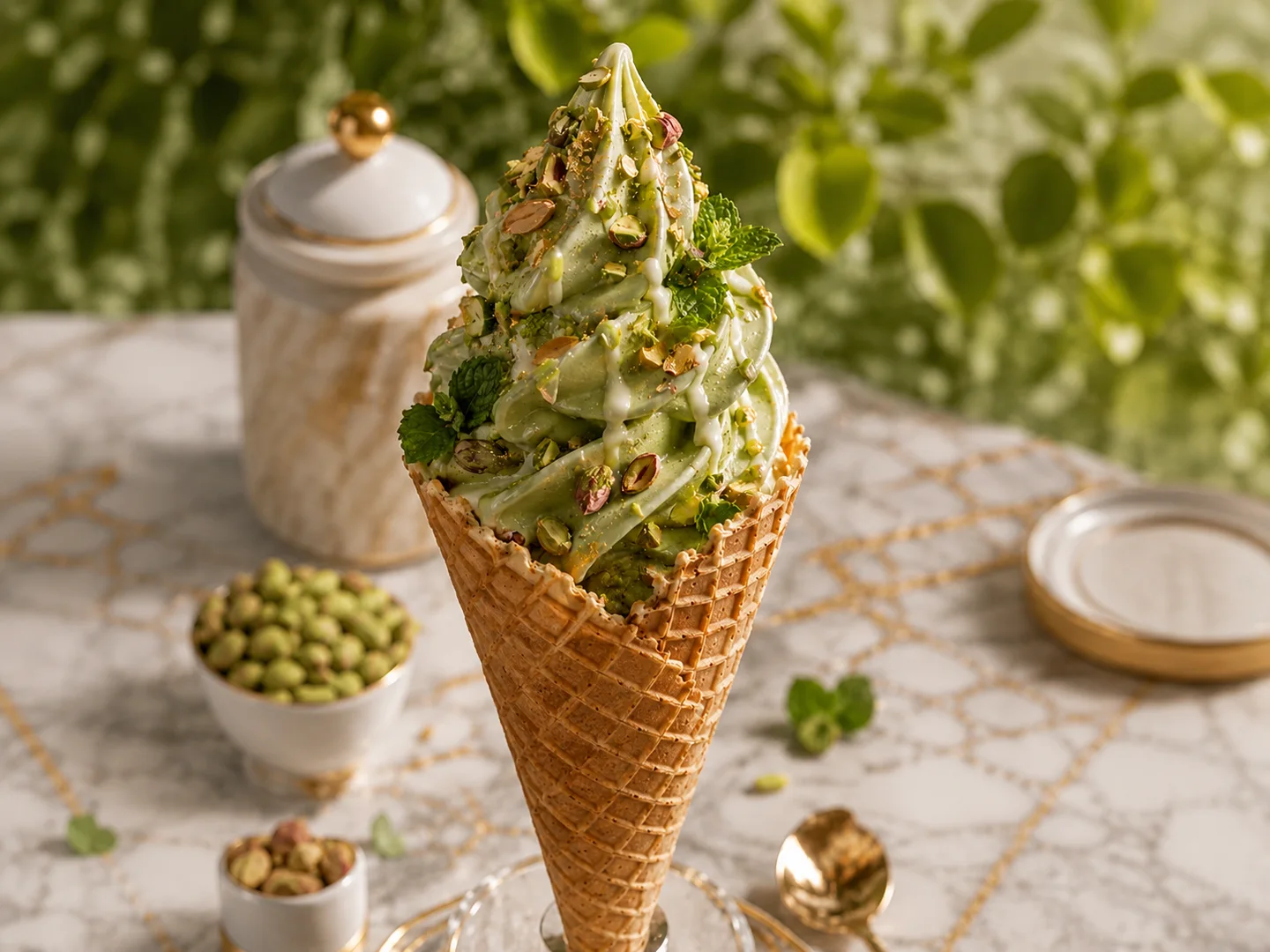
Pistachio Garden Soft Serve
A highly realistic editorial food photograph of one tall pistachio soft-serve ice cream cone standing vertically in the exact center of the frame. The pale pistachio-green soft serve has four thick irregular swirls and a pointed top, covered with thin white cream drizzle, finely chopped pistachios, several visible pistachio halves, and fresh dark-green mint leaves tucked between the swirls. The crisp golden-brown waffle cone has a detailed diamond pattern and sits upright in a transparent glass cone holder at the bottom center.
Place the cone on a cream-white marble tabletop with subtle irregular gold veining. Behind the cone on the left is a cylindrical cream marble jar with warm beige veining, a white domed lid, a thin gold rim, and a polished gold ball handle. A small white bowl of shelled pistachios sits in the left middle ground, with a smaller white cup of mixed pistachios near the lower-left edge. A reflective gold dessert spoon lies near the lower-right corner. A shallow cream ceramic dish with a gold rim is softly blurred in the right background. Include a few scattered pistachios and mint leaves on the table.
The background is filled with softly blurred green garden foliage and circular natural bokeh. Warm late-afternoon sunlight comes from the upper left, producing realistic highlights, gentle shadows, visible ice-cream texture and a fresh summer atmosphere. Close-up food photography, eye-level camera, 85mm lens, f/2.8, shallow depth of field, natural color, realistic materials, premium cookbook photography, landscape 4:3 composition.
Exactly one ice cream cone. No hands, no people, no additional desserts, no duplicate cone, no floating ingredients, no excessive melting, no text, no logo, no watermark, no artificial CGI appearance.
Sunlit Mediterranean Reading Room
A highly realistic wide interior photograph of a quiet rustic Mediterranean living room. A large deep navy-blue linen sofa fills the left half of the frame, viewed slightly from the front. The upholstery is softly wrinkled and naturally worn, with one large square navy cushion standing upright on the left and a smaller rectangular navy cushion leaning on the right. A muted coral-pink linen throw with fringed ends is loosely draped across the right side of the sofa. An open cream-colored paperback book rests face-up on the center-left seat cushion.
Immediately to the right of the sofa is a small old rectangular wooden side table made from dark weathered timber. A handmade beige-speckled ceramic coffee cup sits near its back edge. Behind the table stands a tall indoor olive tree with a thin natural trunk and many narrow dusty-green leaves, planted in a large weathered terracotta pot.
The walls are warm off-white hand-applied plaster with visible uneven texture, hairline cracks and several small chipped areas exposing gray material underneath. On the right is a tall rounded stone archway with a partially open dark wooden door. Through the archway, show a bright sunlit courtyard containing several simple terracotta pots and green Mediterranean plants. The floor consists of irregular aged terracotta tiles with natural color variation. A coarse woven jute rug enters from the bottom-right corner. A dark wooden ceiling fan is partly visible in the upper-left corner.
Natural late-morning sunlight enters through the doorway, creating soft realistic shadows across the tiled floor and wall. Authentic lived-in home, restrained navy, coral, terracotta and warm cream palette. Architectural editorial photography, eye-level view, 28mm lens, realistic perspective, natural textures, landscape 4:3.
No people, no modern decorations, no additional furniture, no wall art, no text, no logos, no perfect showroom styling, no glossy CGI surfaces.
Low Forehand Tennis Return
A highly realistic professional sports photograph of one athletic adult female tennis player performing an extremely low stretched forehand return on an outdoor hard court. She is positioned slightly right of center and faces toward the left side of the frame. She has tan skin, a strong natural athletic build, and dark-brown hair tightly braided back into a compact bun. Her expression is focused and slightly strained, with visible natural skin texture and a subtle sheen of perspiration.
She wears a plain dark forest-green sleeveless racerback tennis top, a short white pleated tennis skirt, white low-cut athletic shoes and a very thin gold necklace. Her left leg is deeply bent beneath her body while her right leg extends far behind toward the lower-right side of the frame. Her torso leans diagonally forward. One arm reaches down and forward, gripping a dark teal tennis racket with a white handle; the racket head is almost touching the court near the lower-left foreground. Her free arm stretches horizontally backward to the right for balance.
Place one bright yellow-green tennis ball in midair near the lower-left edge, approximately twenty centimeters above the court and just ahead of the racket. The court has muted coral-red outer areas, a desaturated slate-blue playing area and clean white boundary lines. Behind the player is a tall dark-green chain-link fence with deep shadowy green trees beyond it.
Strong warm late-afternoon sunlight strikes the player from the upper left, creating crisp shadows extending to the lower right, defined arm and leg muscles, and realistic highlights on perspiring skin. Freeze the action sharply while keeping the distant foliage softly blurred. Professional courtside sports photography, low eye-level camera, 135mm telephoto lens, fast shutter speed, realistic anatomy, natural colors, landscape 4:3.
Exactly one player, one racket and one tennis ball. No spectators, no second racket, no extra limbs, no distorted hands, no floating equipment, no text, no logo, no watermark, no dramatic special effects.
Miniature Lemon Tart Pool
A whimsical but photorealistic macro food photograph of one large round lemon tart transformed into a miniature swimming pool. The tart is centered in the lower two-thirds of a landscape 4:3 frame. It has a thick golden-brown fluted pastry crust with crisp baked texture and a smooth glossy bright-yellow lemon-curd surface. The middle of the tart contains one perfectly round recessed pool filled with transparent turquoise-blue gelatin resembling clear swimming-pool water, with subtle realistic ripples and reflections.
Include exactly three miniature adult people. On the upper-left inner edge of the tart, a miniature man wearing dark navy swim briefs sits with his lower legs in the turquoise pool. Behind him is one small white lounge chair beneath a coral-red-and-white striped beach umbrella. On the upper-right inner edge, a miniature woman wearing a red one-piece swimsuit and a pale straw sunhat sits beside a second white lounge chair beneath a turquoise-and-white striped umbrella. In the center of the pool, a third miniature woman in a light-colored swimsuit reclines on a small yellow lemon-slice inflatable ring. Place one tiny polished silver pool ladder at the right edge of the turquoise pool.
The tart rests on a smooth pale-aqua tabletop. A clean coral-pink studio wall fills the upper background, separated from the tabletop by a straight horizontal line slightly above the tart. Soft diffused studio lighting comes from the upper left, producing gentle shadows, glossy lemon-curd highlights and realistic pastry texture. Macro product photography with a subtle tilt-shift miniature effect, 90mm macro lens, shallow depth of field, bright restrained pastel palette, clean commercial composition.
Exactly one tart, three miniature people, two striped umbrellas, two lounge chairs, one lemon float and one pool ladder. No additional figures, no extra furniture, no fruit decorations, no text, no logos, no watermark, no distorted miniatures, no cartoon rendering.
How to Create an Image with AI
01
Launch Try OC Maker
Open Try OC Maker’s Text to Image AI. Log in to your account or sign up for free to start creating images.
02
Enter Your Text Prompt
Describe the image you want in the prompt box. Include the subject, visual style, colors, background, lighting, and composition for better results.
03
Generate Your Image
Once you’re satisfied with your text prompt, click “Generate” to turn your description into a detailed AI-generated image.
04
Customize & Download Your Image
Choose an AI model, aspect ratio, and other available settings to customize the output. When you’re happy with the result, download your image to your device.
Create original images for social posts, campaigns, and video thumbnails, or turn your video scripts into clear storyboard frames. Produce more content for Instagram, Facebook, TikTok, and other platforms to keep your audience engaged and grow your following.
Create Product Images for Less
Describe your product concept, packaging, or preferred setting and generate images before production begins. Compare different backgrounds, lighting, and lifestyle scenes without arranging a new photoshoot for every early idea.
Turn Stories into Illustrations
Create detailed, richly colored illustrations that stay close to your story. Text to Image AI can handle complex scenes, small but legible text, and well-balanced layouts for book covers, chapter illustrations, and illustrated pages.
Make Every Lesson Easier to Understand
Use Text to Image AI to turn complex topics and step-by-step processes into images that are easier to understand. Generate diagrams, examples, or classroom scenes for presentations, worksheets, and training materials. This saves preparation time and gives students a clearer way to understand the topic.
Visualize OCs Without Drawing
Describe your OC’s appearance, outfit, expression, pose, and setting to create a character image from scratch. Explore different versions and build a clear visual reference for stories, roleplay, games, or future artwork—even if you cannot draw.
Discover More Try OC Maker Tools
Text to Image AI FAQs
What is text-to-image AI?
Text-to-image AI is an artificial intelligence technology that generates new images from written descriptions. In your prompt, you can describe people, objects, actions, settings, art styles, composition, and lighting, and AI will turn that information into realistic photos, illustrations, anime characters, 3D artwork, or product images.
Which is the best AI tool for text-to-image creation?
No single text-to-image tool is right for every creative task. Prompt accuracy, photorealism, image editing features, generation speed, and cost can vary from one text-to-image AI tool to another. Try OC Maker brings together different image models, including GPT Image 2, Flux 2, Qwen Image, and Seedream 5.0, making it easy to switch between them based on your needs.
Does your text-to-image generator actually follow instructions?
Our text-to-image generator can accurately identify the subjects, actions, art styles, colors, and background requirements in your prompt and generate images that follow those instructions as closely as possible. Clear and specific descriptions usually produce more accurate image results.
How do I turn text into an image?
First, enter a description of the image you want to create. Then, choose a suitable image model, aspect ratio, and any other generation settings. Once you click Generate, AI will turn your description into an image. You can review the result, add more details to your prompt, or try another model before downloading your favorite version.
How do I write a good text-to-image prompt?
An effective prompt usually includes the subject, action, style, setting, composition, lighting, and mood. For example: “An orange cat sitting outside a ramen shop in Tokyo on a rainy night, realistic street photography, warm storefront lighting, low-angle shot, full-body composition.”
Which model currently provides the most realistic text-to-image generation results?
Based on current benchmark results, GPT Image 2 is one of the strongest models for generating realistic images. It performs particularly well with natural lighting, human skin, realistic materials, and prompt understanding. Flux 2 is also well suited to photographic portraits, product images, and similar scenes.
How does text-to-image AI work?
Text-to-image AI analyzes the people, objects, actions, styles, and settings described in your prompt. It then converts those words into visual information that the model can understand before rendering a complete image.
Is your AI tool beginner-friendly for text-to-image generation?
Yes. You do not need drawing experience or professional prompting skills. Simply describe the image you want in everyday language, choose a model, and click Generate.
Go from Text to Image in Seconds
Turn text into high-quality images effortlessly with AI. Get started with your first image in just a few clicks.





/w1440.webp)
/w1440.webp)
/w1440.webp)
/w1440.webp)
/w1440.webp)
/w1440.webp)
/w1440.webp)
/w1440.webp)
/w1440.webp)